
Product photography that sells: White background, sizes, and formats (2025 Guide)
- Oct 6, 2025
- 4 min read
In e-commerce, the image is your customer's first impression — and in many cases, what determines whether they buy or leave.A clear, consistent, and professional photo not only improves the visual appeal of your online store, but also builds trust, increases CTR, reduces returns, and speeds up the buying decision by showing the product exactly as it is.
Today, the standard for online stores and marketplaces is to use clean product photos with a pure white background, consistent framing, and true-to-life colors. This ensures a flawless, conversion-oriented visual experience.
CONTENTS:
1. What is a “ready-to-sell” photo?
A professional e-commerce image must meet certain technical and visual standards to build trust:
It should always include:
A clean, solid white background
Consistent framing across all views
True-to-life colors (sRGB color space)
Sharpness in logos, labels, and fine details
Clean presentation: no dust or fingerprints
Web-optimized export settings
This ensures a clear and professional visual experience for the user, increasing the chances of conversion.


White background product photos for E-commerce
2. White background: When to use it and common mistakes
A white background is the standard for main product images in e-commerce and marketplaces. It’s typically used in:
Main product photo (Amazon, Shopify, etc.)
Printed and digital catalogs
Product comparison images
Advantages:
Visual consistency across the entire store
Quick and easy product recognition
Compliance with marketplace requirements
Common Mistakes:
Off-white or “grayish” backgrounds instead of pure white
Visible halos around the edges
Harsh or poorly simulated shadows
Jagged or rough edge cutouts
Over-compression that reduces image quality
Unrealistic contrast that distorts the product’s true appearance


Amateur vs. Professional Product Photography
White Background Checklist:
✅ Pure white (RGB 255, 255, 255)
✅ Soft, natural shadows
✅ No harsh edges or visible halos
✅ Accurate texture and true-to-life color
✅ Sufficient resolution for zoom
3. Natural shadow vs. Digital shadow cutout
Natural Shadow: Adds realism — ideal for your own website, social media, and secondary product photos. It conveys a more organic and natural feel.
Digital Shadow: Commonly used in catalogs and marketplaces, with a pure white background and full control over the edges. Perfect for clean integrations and product mockups.
Each technique has its purpose, and in many cases, we use a combination of both depending on the client's visual strategy.


Jewelry images showing shadows
4. Recommended sizes and resolution for E-commerce
Correct image sizes prevent pictures from looking pixelated or too heavy:
Own website: Longest side between 2,000 and 3,000 px
Secondary photos: Consistent views (front, ¾ angle, detail)
Marketplaces: Adapt to platform requirements (e.g., Amazon minimum 1,000 px per side)
Recommended compression: Quality 80–90 for web use
WebP format: Reduces file size without losing quality, ideal for e-commerce, although not all CMS support it
Guideline Table:
Printed catalog: 300 dpi, size depending on layout
E-commerce: 2,000–3,000 px
Amazon photography: Minimum 1,000 px, pure white background (we recommend at least 2,500 px)
5. File formats and color
Color space: sRGB (standard for screens and marketplaces)
JPEG: Ideal for photos on the web and digital catalogs
PNG: Supports transparency. Best for images without backgrounds, perfect for layouts, websites, or photo composites
TIFF/PSD: Formats used by professionals for editing or printing
6. Professional workflow and quality control
This is how we work to avoid surprises:
Initial briefing: References, style guide, and category specifications
Production: Studio shoot with controlled lighting
Retouching: Cleaning, color correction, and visual consistency
Final check: Internal reviews before delivery
This ensures that every image meets the standards of today’s e-commerce.

7. Retouching that helps sell (Without misleading)
Professional retouching corrects flaws without altering reality:
We remove dust, fingerprints, and tiny scratches.
We adjust lighting and color for consistency.
We straighten framing and balance tones.
We never change the product’s physical features. This way, we create images that are both attractive and honest.

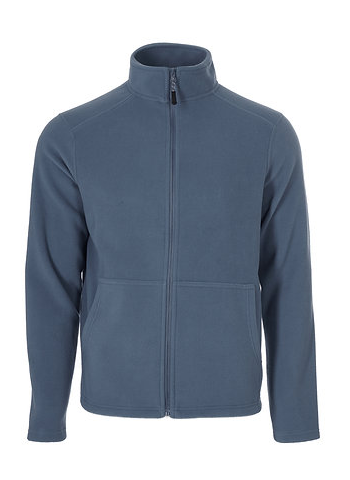

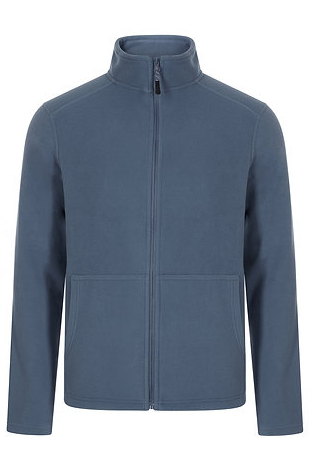
Before and after professional retouching of a jacket
8. When to add 360° views or short videos?
Product videos showcase details and features that photos cannot capture. Recommended for:
Items with moving parts or assembly
Social media advertising
Premium products where detail makes a difference
Video showcasing the features of a jacket
9. AI: Lifestyle images created from your photos
Using Artificial Intelligence, we create contextual images (home, office, outdoor) from real photos of your products. This enables banners, ads, and social media content without the need for large additional productions.


Bag photos with AI-Generated creative backgrounds
Product photography is a strategic tool to stand out in e-commerce.
Professional images with a white background, proper sizing, and precise retouching build trust and reduce buying barriers. If you want to differentiate yourself in an increasingly competitive market, invest in photos that show your product with the quality it deserves.
Ready to improve your catalog? Contact us and discover how we do it.
Before starting your photo shoot, prepare:
✅ Product list and priorities
✅ Props and accessories if needed
✅ Color notes and style guides
✅ Reference examples
✅ Packaging/shipping conditions
What does a standard E-commerce photo include?
White background, consistent framing, true-to-life color, and a clean visual appearance.
White background or natural shadow — Which should you choose?
It depends on the use: marketplaces require pure white backgrounds; social media and your own website accept natural shadows. If the images are for your website, creating a unique style aligned with your brand identity to stand out is essential.
What size and format are best for the web?
Between 2,000 and 3,000 pixels per side, in high-quality JPEG format. This size is more than enough for standard e-commerce and allows zooming without losing much detail.
Typical delivery times
5 business days from receipt of products and approval of proofs. Express service available within 24 to 48 hours.
How do I send and receive the products?
You can send them to our photography studio and receive them back after the session, carefully packed.
Can I request a proof before?
Yes, we offer no-obligation proofs so you can see the quality before committing.


Comments